
What you’ll need
- A published iOS app with an App Store listing to review.
- Access to the app in App Store Connect, including analytics and the permissions needed to submit the listing changes you approve.
- A clear description of the app’s real features and the markets you want to reach.
How the ASO agent works
Read your listing
Connect your app so the agent can review its current metadata, positioning and available App Store Connect analytics.
Research demand
Selfdrive combines proprietary keyword data, your Apple Ads results and competing listings to find search terms that fit what your app actually does.
Draft the update
The agent proposes metadata changes with a reason for each recommendation. Review the exact copy before submission.
Review the outcome
Once an approved update is live, follow downloads and available conversion data alongside the change history.
What you approve
You review the proposed title, subtitle, keywords and other supported listing text. Nothing is submitted as an approved listing update until you accept it.
What runs automatically
The agent researches keywords, reviews available analytics and prepares recommendations. It explains the work in your daily report.
ASO keyword research that leads to a listing draft
Start with the app’s real use case, compare relevant search terms and competing listings, then review the proposed metadata. Selfdrive connects research to a decision you can approve rather than leaving you with an isolated list of keywords.
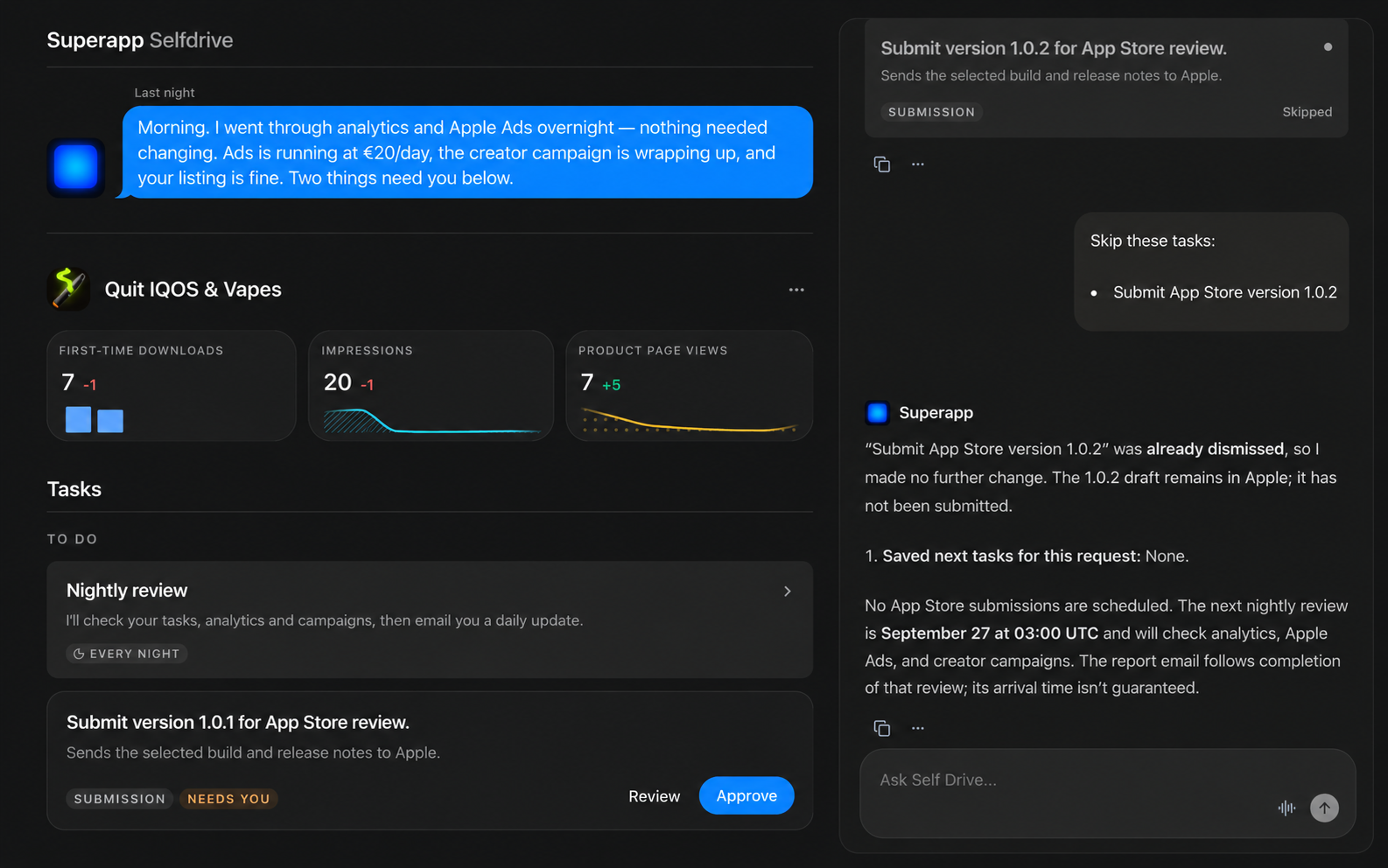
The shared Selfdrive dashboard from our landing page shows how recommendations, app analytics and pending work come together.
App Store keyword research and in-app events
Choose words that match released features and the audience you serve. Compare available performance data over consistent periods rather than treating a ranking change as proof of causation. Use the ASO audit to start reviewing your listing.
For a real, time-bound event in your app, Selfdrive can prepare event text and artwork. After your approval, the workflow creates a draft in App Store Connect. You still submit that event to Apple for review; a permanent feature or a sale should not be presented as an in-app event.
Choosing the best ASO tool for your workflow
The best ASO tool depends on whether you need detailed research software or help turning research into approved work. Compare scope and responsibility, not unsupported promises about downloads.
ASO optimization tool comparison
Check the linked providers for current scope and plans.
| Tool | Research workflow | Next step |
|---|---|---|
| Selfdrive | App-focused research with available ad and listing data | Agent prepares listing changes for your approval |
| AppTweak | ASO and competitive intelligence, keyword tracking | Use platform insights to guide your publishing workflow |
| Astro | Mac app for keyword discovery and monitoring | Use researched keywords in your metadata |
AppTweak features · Astro features · ASO tools guide
Connect listing work with website SEO or compare the complete app marketing workflow.
Your daily ASO report
See what the agent worked on, what needs your approval, and what it plans to do next.
Example report
- Research
- A more specific App Store keyword matches the app’s core use case.
- Waiting for you
- A revised subtitle and keyword field are drafted, with an explanation of the changes.
- Next move
- Review the proposed listing update. After publication, compare available analytics with the prior period.
Controls and limits
You publish the promise. Approve listing changes before submission. Copy should describe features your app actually offers.
Apple has the final review. Your approval authorizes the next step. Apple’s metadata rules and review process still apply.
Evidence over rankings. Track listing performance over time. Keyword research does not guarantee a rank or a number of downloads.
Usage and costs
ASO agent work uses Superapp credits. There is no advertising spend required for an organic listing update. Check your plan and credit balance before starting work.
View Superapp plansSelfdrive and ASO tools
| What matters | Selfdrive | ASO tools | Do it yourself |
|---|---|---|---|
| Research | Agent turns keyword research into a proposed next move. | Tools provide data for you to interpret. | You research terms and evaluate competing listings. |
| Changes | Listing drafts wait for your approval. | Drafting and publishing depend on the tool. | You write and submit each change. |
| Follow-through | The daily report connects proposals and available app analytics. | You coordinate the tool with your publishing process. | You maintain your own record of updates and results. |